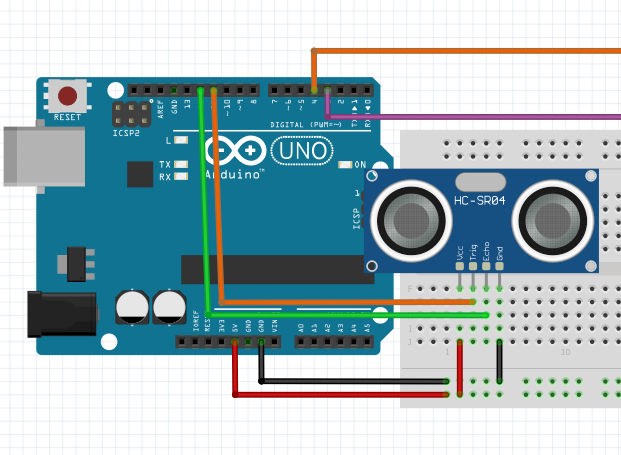
This tutorial will guide you through using an ultrasonic sensor to measure distance and display the results in both centimeters and inches using an Arduino. We'll use the HC-SR04 ultrasonic sensor for this project.
Humans can hear sounds within the range of 20 dB to 20,000 dB. Sounds below 20 dB are too faint for human ears, and sounds above 20,000 dB are beyond human hearing capacity.
Ultrasonic waves are sound waves with frequencies above 20 kHz (20,000 Hz), making them inaudible to humans. Bats use ultrasonic waves for echolocation, allowing them to navigate in the dark by emitting high-frequency sounds and interpreting the echoes. Inspired by bats, ultrasonic technology is widely used in applications such as SONAR (used in submarines) and RADAR (used for detecting objects at a distance).
Ultrasonic sensors like the HC-SR04 use high-frequency sound waves to measure distances. The sensor emits an ultrasonic pulse that travels through the air and reflects off an object. The time taken for the echo to return is measured and converted into a distance reading using the speed of sound.
const int trigPin = 11; // Trigger pin
const int echoPin = 12; // Echo pin
long duration; // Duration of the received pulse
float distanceCm; // Distance in centimeters
float distanceInches; // Distance in inches
void setup() {
Serial.begin(9600);
pinMode(trigPin, OUTPUT);
pinMode(echoPin, INPUT);
}
void loop() {
digitalWrite(trigPin, LOW);
delayMicroseconds(5);
digitalWrite(trigPin, HIGH);
delayMicroseconds(10);
digitalWrite(trigPin, LOW);
duration = pulseIn(echoPin, HIGH);
distanceCm = (duration * 0.0343) / 2;
distanceInches = (duration * 0.0135) / 2;
Serial.print("Distance: ");
Serial.print(distanceCm);
Serial.print(" cm, ");
Serial.print(distanceInches);
Serial.println(" inches");
delay(100);
}
If you want to use LEDs to indicate distance:
const int trigPin = 11;
const int echoPin = 12;
const int led1 = 8;
const int led2 = 9;
long duration;
float distance;
void setup() {
pinMode(trigPin, OUTPUT);
pinMode(echoPin, INPUT);
pinMode(led1, OUTPUT);
pinMode(led2, OUTPUT);
Serial.begin(9600);
Serial.println("Testing Ultrasonic Sensor");
}
void loop() {
digitalWrite(trigPin, LOW);
delayMicroseconds(2);
digitalWrite(trigPin, HIGH);
delayMicroseconds(10);
digitalWrite(trigPin, LOW);
duration = pulseIn(echoPin, HIGH);
distance = (duration * 0.034) / 2;
Serial.print("Distance: ");
Serial.print(distance);
Serial.println(" cm");
if (distance > 50) {
digitalWrite(led1, HIGH);
digitalWrite(led2, LOW);
} else {
digitalWrite(led2, HIGH);
digitalWrite(led1, LOW);
}
delay(100);
}
You have successfully set up an ultrasonic distance measurement system using an Arduino and an HC-SR04 sensor. Inspired by bats and used in SONAR and RADAR systems, ultrasonic technology is widely implemented in robotics, automation, and navigation. This project can be expanded for various applications such as obstacle detection, distance measurement, and automation systems. Experiment with different setups and see what you can create!